Internet Basics
In order for users to use the project created by the programmer, they need to communicate with each other. We briefly studied this connection as the Internet. So what is it? How does it work?
🗿 HISTORY
The foundation stone of the Internet was laid in 1969 under the name ARPANET. The founder was the US Defense Advanced Research Projects Agency (ARPA). As you can guess from the name, this invention was originally created for defense. The fact is that initially the communication of an entire state was controlled from a single center, if this center was damaged, communication with other states was completely cut off. During the Cold War, this would have been a huge loss. Therefore, ARPANET was designed like a spider's web. It did not have the center itself, and damage to one place could not completely cut off communication.
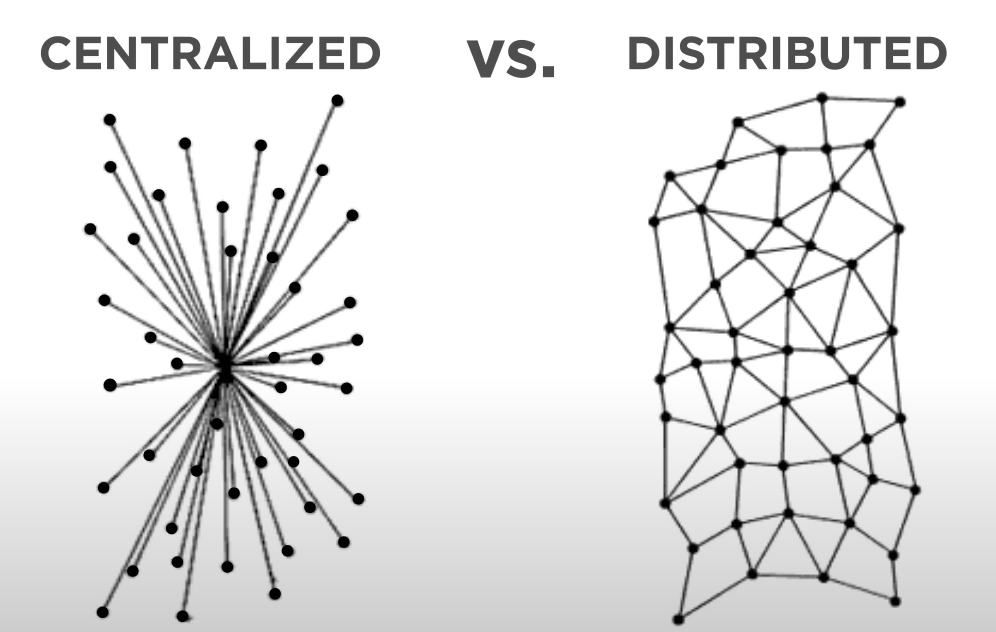
In 1973, this network began to be seen as effective not only for defense, but also for establishing scientific and social connections. The picture below shows the inventors who began working on the new generation of ARPANET in 1973. Thanks to these people, the Internet appeared on January 1, 1983.
The emergence of giants such as AMAZON and GOOGLE made the Internet very popular in the world by the beginning of 2000.
Access to the Internet
A network is a group of computers or other devices that are connected to each other. For example, you may have a network of computers and devices in your home. Your friend who lives next door may also have a similar network of devices. Their neighbor may have a similar network of devices. When all of these networks are connected together, they form the Internet.
The Internet is a network of networks.
How the Internet Works: An Overview
It works by connecting devices and computer systems together using a set of protocols. These protocols define how information is exchanged between devices and ensure that data is transmitted reliably and securely.
Basic Concepts and Terminology
To understand the Internet, it is important to familiarize yourself with some basic concepts and terms. Here are some basic terms and concepts to know:
- Protocol: A set of rules and standards that define how data is exchanged between devices and systems.
- Packet: A small unit of data transmitted over the Internet.
- Router: A device that routes data packets between different networks.
- LAN: Devices connected to each other via a switch, even without the Internet
- Switch: A device that routes data packets for a LAN (local area network)
- IP address: A unique identifier assigned to each device on an IP (Internet Protocol) network, used to route data to the correct address.
- TCP: TCP (Transmission Control Protocol) is used to ensure that packets are transmitted reliably and in the correct order.
- Domain name: A human-readable name used to identify a website, such as google.com.
- DNS: The Domain Name System (DNS) is the system responsible for translating domain names into IP addresses.
- HTTP: Hypertext Transfer Protocol is used to transfer data between a client (e.g., a web browser) and a server (e.g., a website).
- HTTPS: An encrypted version of HTTP used to provide secure communication between a client and a server.
- SSL/TLS: The Secure Sockets Layer and Transport Layer Security protocols are used to provide secure communication over the internet.
What is an IP address?
Internet Protocol addresses are numbers that computers use to identify each other on the Internet. For example, the IP address for my.gov.uz is 216.146.46.10.
An organization called ICANN is responsible for distributing IP addresses to ensure that no two users use the same IP address.
What is IPv6?
The current Internet standard, known as IPv4, allows for only about 4 billion IP addresses. This was a huge number in the 1970s, but today, due to the large number of users, IPv4 addresses are almost exhausted.
So, Internet engineers developed a new standard called IPv6. IPv6 allows for an incredible number (39 digits) of unique addresses. This means that the world will never again have to deal with IP.
Everyone on the Internet has an IP address. It's like an ID number on a passport. Your ID number makes you unique in the world. Even if two people have the same age, FIO, place of birth, they have different JSHSHIR, which helps in finding them. IP address is the same. Every device and application on the Internet has its own IP address. This device could be our phone.
Surface Working Technique:
1. I typed google.com in my mobile chrome browser

2. First it goes to my wifi router, then via the cable to the DNS that my Comnet Internet Service Provider (ISP) has forwarded. As I said before, to find a program or device on the internet, you need an IP address. And DNS gives me the IP address of the google.com program. If it doesn't exist in DNS, it asks the DNS one above it, and so on, SO in the end if the program exists, it returns me the IP address. SAY, IP: 123.123.123.123
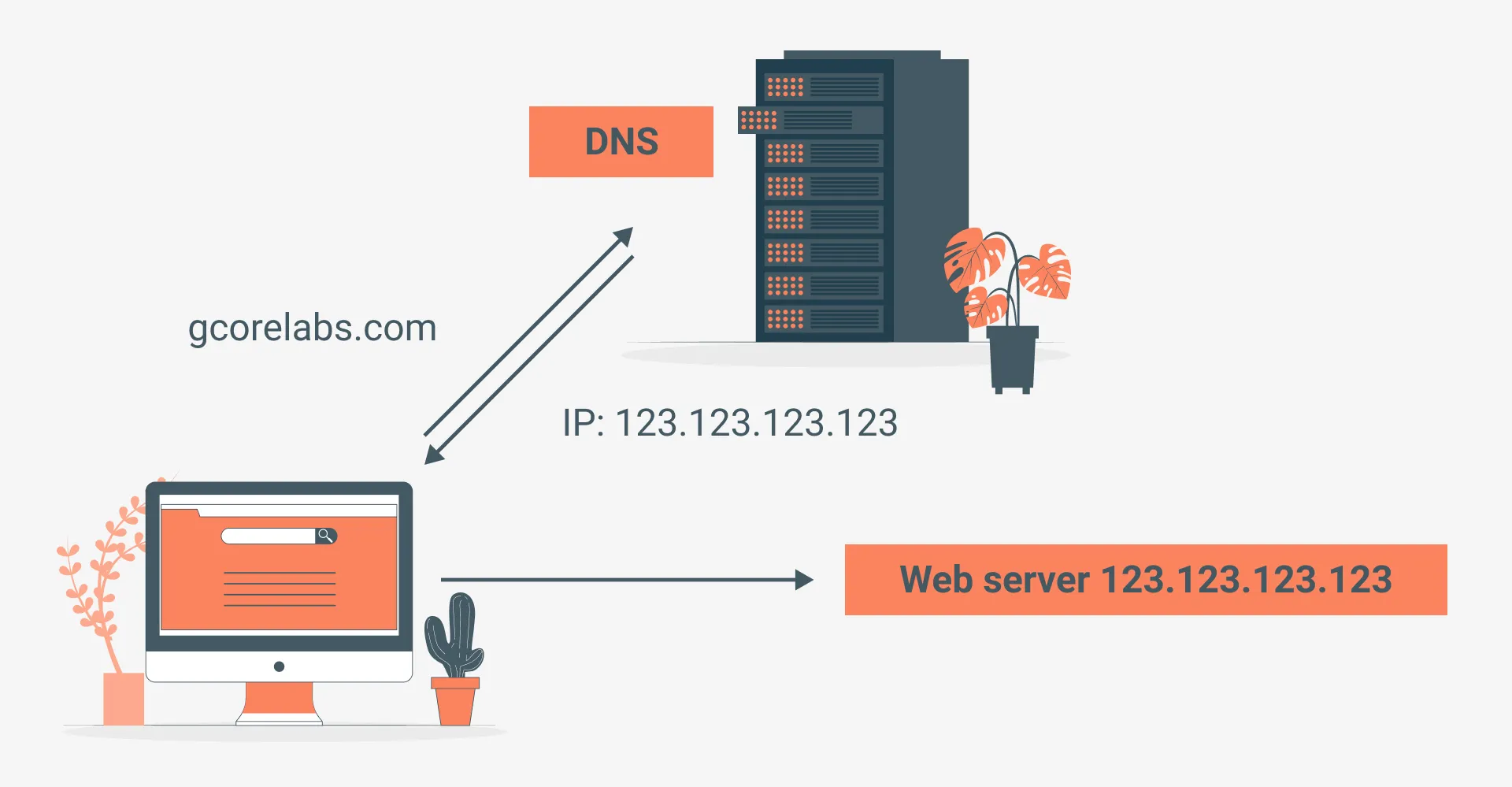
3. So now a new request is sent automatically via IP. Currently, more than 90% of Internet connections are restored via wires. Where is our site? Maybe on a special web-program storing computer (server) in TEXAS, America. And I am in Tashkent.
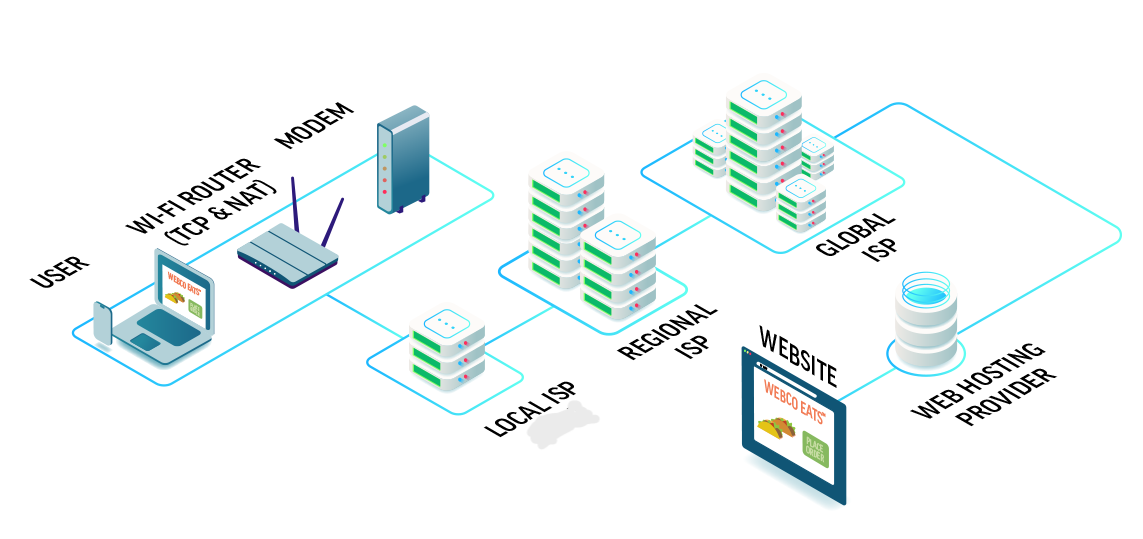
The request went to the Internet provider (ISP) in the district. "Do you have the IP I'm looking for?" We ask the ISP. The ISP knows all the IPs in the district. "I don't have it, ask me from the top!". Above it is Tashkent, above it is the central ISP of Uzbekistan, above it is the Global provider. Now the Global one will have a clear answer: "Your IP address is in America." If we go to the central ISP of America, it will redirect to Texas, and there the google.com we searched for is on the server belonging to some WEB HOSTING provider (a service that places online programs on its server for money on the Internet). The program will now return the necessary files to us as a response
4. On the Internet, files are sent in small packets. Each packet travels its own path and is reassembled when it reaches its destination. Of course, these packets are not assembled by themselves, but by TCP, and if a certain one is lost on the way, TCP will request new packets for us to replace them.
In order for the packet to arrive safely on the way, SSL/TLS certificates are needed so that someone cannot intercept or modify it. This certificate creates a secure, protected environment between the client and the server. Technically speaking. Now each piece of information and file is sent in an unreadable format, and the person receiving it cannot read anything. However, the client and server can easily understand it. //* SSL/TLS is available: https://www.google.com/ *\\ //* SSL/TLS is not available: http://www.google.com/ *\\ For example, the site.
When the files arrive safely, my browser shows me the program. Now, DNS is not required for subsequent requests. The rest is the same.